In the fast-paced world of e-commerce, efficiency is key. As online shopping continues to rise, businesses are constantly seeking innovative ways to streamline operations and enhance customer experiences. Enter barcode scanning—an essential tool that’s transforming how retailers manage their inventory and sales processes. With the right technology at their fingertips, WooCommerce merchants can elevate their business game significantly.
Imagine effortlessly tracking products, speeding up checkout processes, and reducing human errors—all thanks to a simple scan. The Barcode Scanner plugin & app for WooCommerce makes this vision a reality. Ready to explore how this powerful duo can revolutionize your store? Let’s dive in!
Integrating a barcode scanner in your WooCommerce store streamlines inventory management. It allows for quick and accurate tracking of stock levels, minimizing discrepancies that can lead to lost sales.
Speed is another key advantage. Scanning items at checkout reduces transaction times significantly. Customers appreciate the efficiency, enhancing their overall shopping experience.
Error reduction is crucial too. Manual data entry often leads to mistakes that can frustrate both staff and customers alike. A barcode scanner eliminates this risk by automating the process.
Additionally, having real-time data available helps you make informed decisions about restocking or promotions. This insight strengthens your business strategy and keeps operations running smoothly.
Scanning integrates seamlessly with various devices like smartphones or tablets, making it accessible for any team member on the go. Adopting this technology positions your store for growth in an increasingly competitive market.
The Barcode Scanner plugin for WooCommerce is a game changer for online retailers. It seamlessly integrates with your existing store, enabling efficient inventory management.
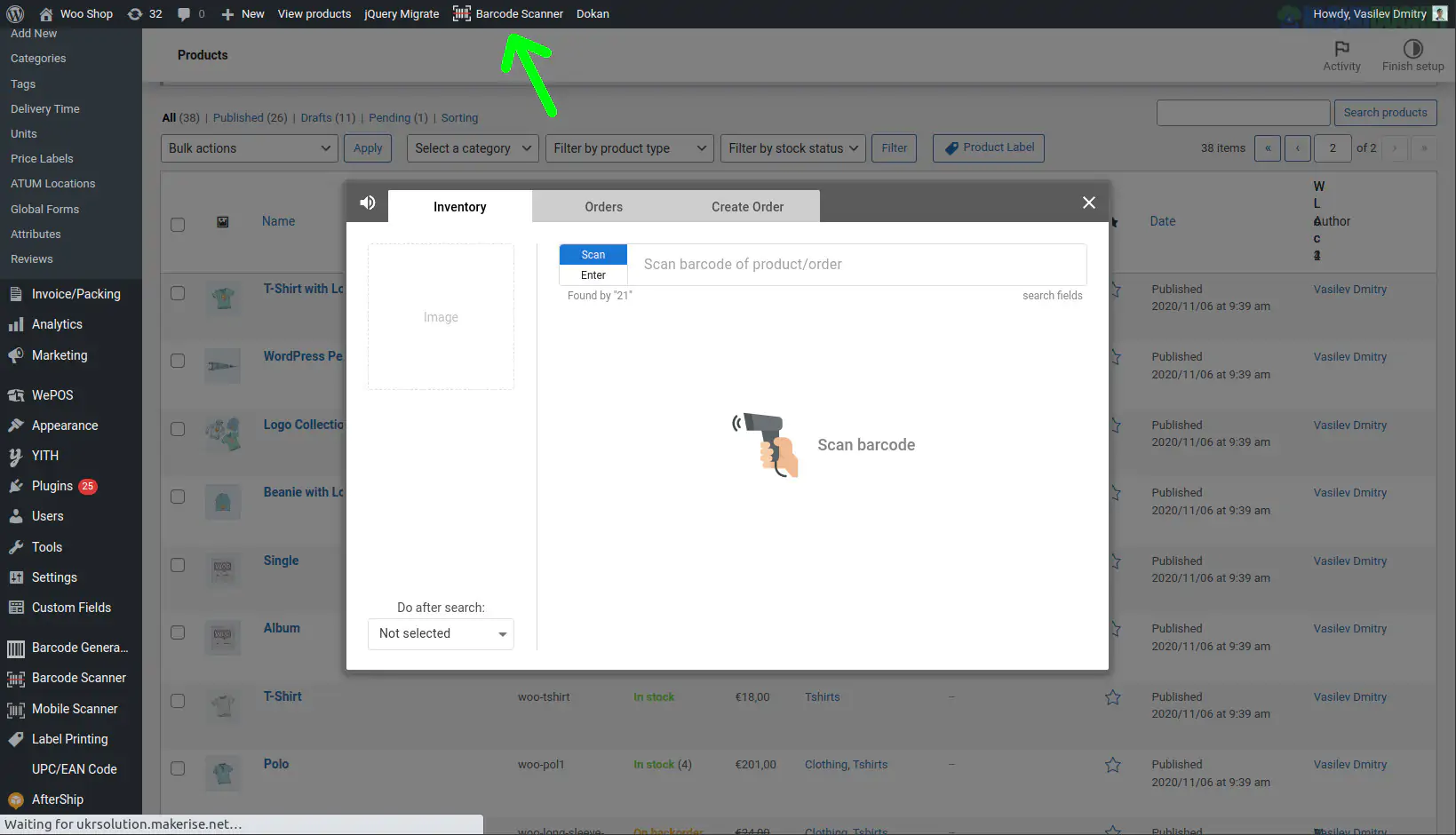
This plugin allows you to scan barcodes directly from your mobile device or scanner. You can quickly add products, update stock levels, and even manage orders without the usual hassle.
Its user-friendly interface streamlines processes that usually consume time. No more manual entry errors or delays in updating inventories.
Additionally, it supports various barcode formats like UPC and QR codes. This flexibility enhances its utility across different business models.
With real-time updates and easy synchronization with your WooCommerce platform, this plugin simplifies operations significantly. You’ll find that managing your e-commerce store becomes more organized and less prone to mistakes when using this tool effectively.
Setting up the Barcode Scanner plugin for WooCommerce is a straightforward process. Begin by installing the plugin from the WordPress repository. Navigate to your admin dashboard, select ""Plugins,"" and search for ""Barcode Scanner."" Click “Install” and then activate it.
Once activated, head over to the settings page of the plugin. Here, you can customize various options according to your business needs. You’ll see fields where you can set preferences for scanning methods and data formats.
Next, connect your barcode scanner device. Most modern scanners plug directly into USB ports or connect via Bluetooth. Ensure that it's properly linked before proceeding.
Now, test out the setup with a few products in your inventory. Scan items and observe how they populate within your WooCommerce system. This hands-on approach will help you familiarize yourself with its functionalities efficiently.
The Barcode Scanner app for WooCommerce brings a suite of robust features that enhance efficiency. One standout function is real-time inventory management. As items are scanned, stock levels adjust instantly, minimizing the risk of overselling.
Another impressive feature is the seamless integration with your existing WooCommerce store. This allows for quick syncing of product data without any complex setup processes.
Users also benefit from easy access to sales analytics through the app. Tracking performance becomes straightforward; you can identify which products are flying off the shelves and which aren't.
Additionally, multi-device compatibility enables scanning on various devices—smartphones or tablets alike—ensuring flexibility in how you operate your business.
With user-friendly navigation, even non-tech-savvy individuals can master it quickly, making it an invaluable tool for businesses looking to streamline their operations and improve customer experiences.
Retailers have found remarkable success using the Barcode Scanner plugin & app for WooCommerce. One boutique clothing store streamlined their inventory management, reducing stock discrepancies by 30%. Employees now simply scan items as they arrive and leave the shelves, ensuring accurate tracking.
A local bookstore utilized the app to enhance customer experience. Shoppers browse titles seamlessly while staff can quickly locate books in-store. This improved efficiency led to increased sales during peak hours.
E-commerce businesses also reap benefits. An online electronics retailer integrated the plugin into their order fulfillment process. With instant scanning capabilities, they sped up shipping times by 40%, delighting customers with faster deliveries.
Moreover, a specialty food shop turned to this solution for managing perishable goods. By scanning expiration dates upon arrival, they minimized waste and optimized product rotation—boosting both sustainability efforts and profits within months of implementation.
Choosing the right tools for your e-commerce business is crucial. The Barcode Scanner plugin and app for WooCommerce offer an innovative solution to streamline operations, reduce errors, and enhance customer satisfaction. With its user-friendly interface and robust features, it caters to businesses of all sizes.
Whether you run a small online shop or a larger e-commerce platform, the efficiency gained from integrating barcode scanning can be significant. It simplifies inventory management and speeds up transactions at checkout. Moreover, the real-life applications demonstrate tangible benefits in various retail scenarios.
Assessing your specific needs will help determine if this plugin aligns with your goals. Consider how much time you spend on manual processes versus what could be automated through technology like barcode scanning.
Adopting a Barcode Scanner plugin & app for WooCommerce may just provide that competitive edge you've been seeking while enhancing overall operational effectiveness within your business model.
"
Subscribe to access unlimited downloads of themes, videos, graphics, plugins, and more premium assets for your creative needs.
.jpg) Help Us to Buy More New Theme/Plugin
Help Us to Buy More New Theme/Plugin
Published:
Nov 07, 2025 18:32 PM
Version:
v1.8.0
Category:
Author:
OtherLicense:
GPL v2 or LaterTags: