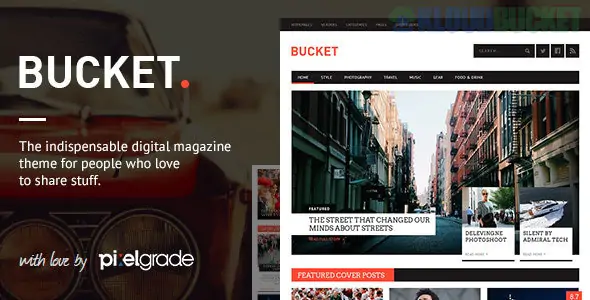
BUCKET is a high-impact, feature-rich Digital Magazine WordPress Theme designed specifically for content creators, publishers, and online magazines. It is defined by its "grid-heavy" layout and its ability to handle massive amounts of content without feeling cluttered.
Unlike standard blog themes, BUCKET uses a sophisticated Layout Builder that allows you to create complex homepages where news, reviews, and featured stories coexist in a structured, magazine-style hierarchy.
Review System: Includes a built-in "Review Score" system that allows you to rate products or services using various criteria (e.g., Performance, Design, Value).
Integrated Mega Menu: A highly visual menu system that displays latest posts with thumbnails directly in the dropdown, encouraging users to discover more content.
Custom Layout Builder: A drag-and-drop tool tailored for magazine structures, letting you mix and match "Latest Posts," "Popular Posts," and "Category Blocks."
Ad Management Ready: Features dedicated, high-conversion "ad spots" in the header, sidebar, and within post content to help monetize your traffic.
Social Sharing Integration: Native social counters and sharing buttons are baked into the UI to drive viral traffic without the need for extra plugins.
BUCKET is built to be fast and SEO-friendly, ensuring your articles rank well in Google News and standard search results:
Feature
Details
Page Builder
Includes a custom-built Page Builder specific to the BUCKET ecosystem.
Performance
Optimized for high traffic with a focus on fast "Time to First Byte" (TTFB).
Responsiveness
Mobile-first "Card" layout that mimics professional news apps on smartphones.
Retina Ready
Vector-based UI elements for sharp text and icons on 4K displays.
SEO
Schema.org microdata integration for "Article" and "Review" rich snippets.
Standard Post: A clean, typography-focused layout for long-form reading.
Video Post: A specialized layout that highlights embedded video content from YouTube or Vimeo.
Review Post: Features a "Bottom Line" summary box with a numerical score.
Gallery Post: High-impact slider or grid for photo-heavy reports.
Contributor Pages: Professional author bios that list all articles written by specific team members.
Thumbnail Consistency: For a magazine layout to look professional, your "Featured Images" should follow a consistent aspect ratio. Use a plugin like Regenerate Thumbnails after importing your content.
Category Hierarchy: BUCKET works best when your categories are well-defined. Use "Parent Categories" for main topics and "Child Categories" for sub-topics to maximize the effectiveness of the Mega Menu.
Child Theme: Always activate bucket-child.zip. Magazine themes often require custom tweaks to the "Read More" logic or ad-placement code; a child theme ensures these remain intact.
Performance Plugins: Because magazine sites load many thumbnails on one page, use a Lazy Load plugin and a CDN (like Cloudflare) to ensure images don't slow down the mobile experience.
BUCKET is ideal for sites like Tech Blogs, Lifestyle Magazines, and Gaming Review portals. It provides a "finished" look that feels like a major media outlet from day one. Its primary strength is the Review System, which adds a layer of authority and interactivity that basic blog themes lack.
Would you like me to help you set up the "Review Score" criteria for your articles, or do you need assistance configuring the Mega Menu to show your latest news?
Subscribe to access unlimited downloads of themes, videos, graphics, plugins, and more premium assets for your creative needs.
.jpg) Help Us to Buy More New Theme/Plugin
Help Us to Buy More New Theme/Plugin
Published:
Jan 18, 2026 18:03 PM
Version:
v1.7.0
Category:
Developer:
ThemeGrillLicense:
GPL v2 or Later