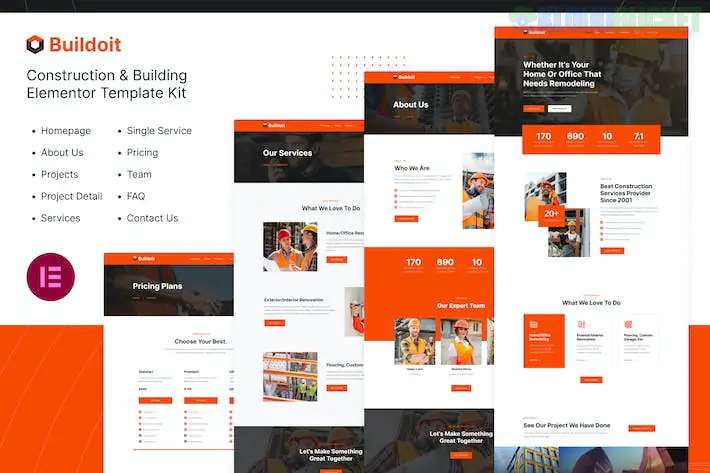
**Buildoit** is a heavy-duty, professional Elementor Template Kit specifically designed for construction companies, architectural firms, and building contractors. It features a rugged, industrial aesthetic with high-contrast colors (typically yellow and dark gray) that scream "safety and reliability."
Like your previous kits, **Buildoit** is built for speed and ease of use, utilizing free plugins to deliver a premium construction site experience.
---
## 🏗️ What’s Inside the Buildoit Kit?
This kit provides a full construction business framework with **12+ essential templates**:
* **Professional Homepage:** Focused on large-scale hero imagery to showcase your biggest projects (skyscrapers, bridges, or residential builds).
* **Service Detail Layouts:** Specialized pages for "General Contracting," "Pre-Construction," "Design-Build," and "Civil Engineering."
* **Project Portfolio:** A robust grid to catalog your completed works, categorized by type (Residential, Commercial, Industrial).
* **Construction-Specific Elements:** Sections for "Safety Awards," "Years of Experience" counters, and "Our Equipment."
* **Lead Generation:** High-visibility "Request a Quote" forms designed to capture project inquiries quickly.
---
## 🛠️ Technical Requirements
Buildoit is a **"Free Version Friendly"** kit. It achieves its industrial look using these free extensions:
* **Elementor (Free Version):** The core page builder.
* **Jeg Elementor Kit:** This is the "heavy machinery" of the kit, providing the project grids and service boxes.
* **MetForm:** Powering the detailed project inquiry and contact forms.
* **Hello Elementor Theme:** The recommended "clean slate" theme for the best performance.
---
## 🚀 The Buildoit Import Blueprint
To ensure the "Safety Yellow" branding and industrial typography apply correctly, follow this sequence:
1. **Preparation:** Install **Hello Elementor** and the **Envato Elements** plugin.
2. **Upload:** Go to `Elements > Installed Kits` and upload your `buildoit-kit.zip`.
3. **The Orange Banner:** Click **"Install Requirements."** This will automatically pull in Jeg Elementor Kit and MetForm.
4. **Global Styles First:** **Import the Global Kit Styles first.** Buildoit uses very specific font weights and button styles that make the site feel "sturdy"—skipping this will make the site look like a generic blog.
5. **Page Creation:** Create your "Home" page, set the layout to **Elementor Full Width**, and import the Home template.
---
## 💡 Construction Marketing Strategy
* **Showcase the Crew:** Construction is a trust-based industry. Use the "Team" template to highlight your project managers and lead engineers with their certifications (e.g., OSHA certified).
* **Project Specs:** On your "Single Project" pages, don't just show a photo. Add a sidebar with details like **Location**, **Project Value**, and **Completion Date**.
* **Safety First:** Add a section or a dedicated page about your "Safety Standards." In 2026, clients are looking for contractors who prioritize on-site safety and compliance.
* **Before & After:** Use an image comparison slider to show a site "Before" and "After" construction to demonstrate the magnitude of your work.
---
**Would you like me to help you set up a "Project Specification" list for your portfolio, or are you having trouble getting the yellow brand colors to apply to your buttons?**
Subscribe to access unlimited downloads of themes, videos, graphics, plugins, and more premium assets for your creative needs.
.jpg) Help Us to Buy More New Theme/Plugin
Help Us to Buy More New Theme/Plugin
Published:
Feb 02, 2026 10:28 AM
Category:
Author:
OtherLicense:
GPL v2 or Later