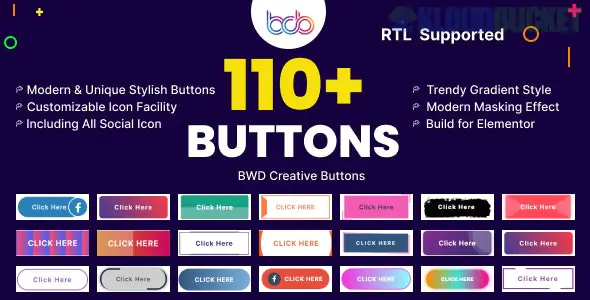
The BWD Creative Buttons addon is a specialized extension for Elementor (created by Best WP Developer) that significantly expands your design options for Call-to-Action (CTA) buttons.
While the standard Elementor button widget is functional, BWD focuses on high-end hover animations and unique shapes that would otherwise require complex custom CSS.
110+ Ready-Made Designs: It comes with a massive library of preset styles, ranging from modern minimalist to high-energy animated buttons.
Creative Hover Effects: Includes advanced animations like ripple effects, borders that "draw" themselves on hover, background slides, and glowing pulses.
RTL Support: Fully compatible with right-to-left languages (Arabic, Hebrew, etc.).
Highly Customizable: You can tweak every aspect of the preset designs, including:
Typography: Full control over fonts and letter spacing.
Colors: Support for solid colors and gradients.
Icons: Easily add and position icons from the FontAwesome library or your own SVGs.
Borders & Shadows: Detailed control over border-radius and box shadows.
The plugin works like a standard Elementor widget once installed:
Search: In the Elementor sidebar, search for "BWD Creative Button."
Drag & Drop: Place it into your section.
Choose a Style: In the Content tab, use the "Button Style" dropdown to browse the 100+ presets.
Customize: Move to the Style tab to match the button to your brand’s color palette and fonts.
It is worth noting that while you can sometimes find the Creative Buttons as a standalone plugin, it is often included as part of the BWD Elementor Addons bundle. This bundle contains over 80+ free widgets, including:
Dual Buttons: Two buttons side-by-side in one widget.
Animated Links: For creative text-based navigation.
Interactive Cards: To showcase services with hover effects.
Use it if: You want your website to feel "premium" and interactive without writing code. These buttons are great for landing pages and "Contact Us" sections.
Avoid it if: You are strictly focused on site speed and want to minimize the number of plugins. While optimized, every additional addon adds a small amount of CSS/JS to your site.
Would you like me to show you how to create a specific effect (like a "Glow" or "Ripple" effect) using this addon, or do you need help finding the download link for the free version?
Subscribe to access unlimited downloads of themes, videos, graphics, plugins, and more premium assets for your creative needs.
.jpg) Help Us to Buy More New Theme/Plugin
Help Us to Buy More New Theme/Plugin
Published:
Jan 18, 2026 11:54 AM
Category:
Author:
OtherLicense:
GPL v2 or Later