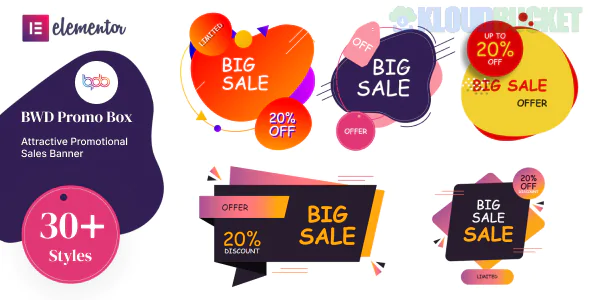
The BWD Promo Box is a specialized Addon for Elementor designed to create high-conversion marketing sections. In a digital landscape where users skim content, a "Promo Box" is your best tool to highlight special offers, new arrivals, or "limited time" deals using eye-catching animations and hover effects.
Unlike a standard image box, BWD focuses specifically on interactive promotions.
The BWD Promo Box pack typically includes a library of 30+ unique styles that go far beyond the basic Elementor "Image Box":
Creative Hover Effects: Over 31+ preset styles where text, buttons, and backgrounds shift or reveal themselves when a user hovers.
Dual-Button Support: Many styles allow for two "Call to Action" buttons (e.g., "Learn More" vs. "Buy Now") within a single box.
Badges & Ribbons: Easily add "Sale," "New," or "50% Off" badges to the corner of the promo box without needing custom CSS.
Animation Library: Entrance animations (Fade, Slide, Zoom) specifically tuned for promotional content.
Fully Responsive: The boxes are designed to stack intelligently on mobile devices so your "Buy" buttons remain clickable.
Once the addon is installed, you will find a new widget in your Elementor sidebar titled "BWD Promo Box." Here is how to configure it:
Select a Style: Under the "Content" tab, use the dropdown to cycle through the 31+ preset layouts. Each has a different animation style.
Media Setup: Upload your background image. For best results, use 800x600px or similar aspect ratios to keep the box consistent.
Title & Description: Add your catchy headline. Keep descriptions under 15 words to maintain the "Promo" feel.
Button Customization: You can toggle between one or two buttons and customize the links/colors for each.
Style Tab: This is where you control the Overlay Color. Adding a slight dark overlay (e.g., 0.3 opacity) ensures your white text is readable over busy images.
The "Scarcity" Look: Use the Badge feature to highlight "Limited Stock." This triggers a psychological nudge to buy.
Service Teasers: Instead of a long list of services, use three Promo Boxes side-by-side on your homepage. Use the hover effect to reveal the price or a "View Details" button.
Category Entrances: For e-commerce sites (like the Glasseo kit we discussed), use Promo Boxes to direct users to specific categories like "Men’s Collection" or "Summer Sale."
A/B Testing Colors: Use the Style tab to make one box a high-contrast color (like Orange or Red) to draw the eye to your most important offer.
Core Requirement: Works with both Elementor Free and Elementor Pro.
Lightweight: It is a specific addon, so it doesn't bloat your site as much as massive "All-in-One" addon packs.
Theme Friendly: Optimized to work perfectly with the Hello Elementor theme.
Would you like me to help you design a specific "Flash Sale" layout using one of the BWD styles, or are you having trouble getting the hover animation to work on mobile?
Subscribe to access unlimited downloads of themes, videos, graphics, plugins, and more premium assets for your creative needs.
.jpg) Help Us to Buy More New Theme/Plugin
Help Us to Buy More New Theme/Plugin
Published:
Feb 02, 2026 10:53 AM
Version:
v1.0.0
Category:
Author:
OtherLicense:
GPL v2 or Later