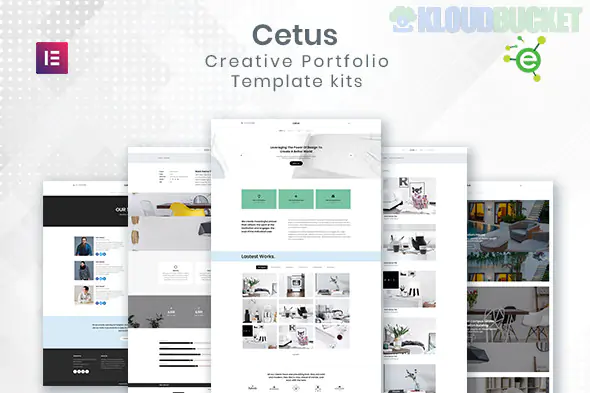
CETUS is a sleek, "Creative Portfolio" Elementor Template Kit designed for agencies, freelancers, and creative professionals who want a high-end, editorial look without the heavy lifting of custom coding. It’s particularly noted for being "Free Version Friendly," meaning it doesn't strictly require Elementor Pro to function.
Here is the essential guide to getting CETUS up and running.
CETUS is designed for variety, ensuring that whether you are an illustrator, a photographer, or a web designer, your work is the hero.
3 Unique Homepage Styles: Choose from different layouts depending on whether you want a bold, typography-focused entry or a visual grid.
3 Portfolio Layouts: Pre-designed grid and list styles to showcase your projects with "Case Study" potential.
12+ Total Templates: Includes "About Me," "Our Services," "Pricing," and "FAQ" pages.
Minimalist Aesthetic: Uses a lot of white space, clean sans-serif fonts, and smooth motion effects to give that "premium agency" feel.
One of the best features of CETUS is that it relies on a suite of free plugins, making it highly accessible:
Elementor (Free Version): The core engine.
Elementor Header, Footer & Blocks: This is what allows you to have a custom navigation and footer without needing Elementor Pro.
MetForm: Used for the contact and inquiry forms.
JetWidgets for Elementor: Adds the specialized portfolio and grid widgets.
PowerPack Lite for Elementor: Provides extra creative widgets like dual-colored headings and fancy buttons.
Stax (Elementor Addons): Used for advanced layout enhancements and icons.
To ensure the layouts don't "break" during import, follow this specific sequence:
Themes: Install and activate the Hello Elementor theme.
The Importer: Install the Envato Elements plugin (available for free in the WordPress repository).
Upload: Go to Elements > Installed Kits and upload your cetus-kit.zip.
Install Requirements: Click the orange "Install Requirements" banner. This is the most important step—it will automatically install all the free plugins listed above.
Global Styles First: Import the Global Kit Styles template before anything else. This ensures your fonts and colors are set site-wide.
Import Pages: Create your pages (Home, About, etc.) and import the corresponding templates from the kit one by one.
Visual Hierarchy: Because CETUS is minimalist, your images need to be top-tier. Use high-resolution PNGs or WebPs with consistent color grading to maintain the kit's "editorial" look.
Typography: CETUS uses bold headings. If you change the font, make sure to pick a typeface that has a "Black" or "Extra Bold" weight to keep the design's impact.
Interactive Elements: Use the motion effects included in the kit (like entrance animations) sparingly. Since this is a portfolio, you want the site to feel fast and responsive, not weighed down by heavy animations.
Single Project Pages: Use the "Portfolio Detail" template to tell a story. Don't just show a photo—add the "Challenge," "Solution," and "Results" of your project to build authority.
Would you like me to help you write a compelling "About Me" story for your creative bio, or are you running into any "Missing Requirements" errors while trying to import the kit?
Subscribe to access unlimited downloads of themes, videos, graphics, plugins, and more premium assets for your creative needs.
.jpg) Help Us to Buy More New Theme/Plugin
Help Us to Buy More New Theme/Plugin
Published:
Feb 02, 2026 10:00 AM
Category:
Author:
OtherLicense:
GPL v2 or Later