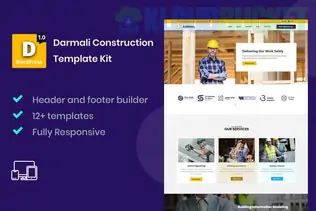
**Darmali** is a heavy-duty, clean, and highly professional Elementor Template Kit designed for construction companies, building contractors, and architectural firms. It is built to emphasize reliability and scale, featuring large, bold typography and high-contrast layouts.
Unlike some of the more "stylized" kits, Darmali is very functional, focusing on getting potential clients to your portfolio and contact forms quickly.
---
## 🏗️ What’s Inside the Darmali Kit?
Darmali is a "Full Site" kit, meaning it provides every page needed for a standard construction business:
* **Homepage:** A high-impact hero section with clear service callouts.
* **About Us:** Dedicated to the company’s history and team expertise.
* **Services & Service Detail:** Individual layouts to describe specific offerings like "Civil Engineering" or "Renovations."
* **Projects/Portfolio:** Grid layouts to showcase completed work with filterable categories.
* **Contact Us:** Features integrated Google Maps placeholders and professional contact forms.
* **FAQ & 404 Pages:** Ensuring the user experience is smooth across the entire site.
## 🛠️ Technical Requirements
Darmali is modern and powerful, which means it has a strict requirement for **Elementor Pro** to handle the core site architecture (Header, Footer, and Single Project templates).
* **Elementor Pro:** **Required** for the Theme Builder features.
* **Hello Elementor Theme:** The recommended lightweight base theme.
* **MetForm:** Usually required for the advanced "Request a Quote" forms.
* **ElementsKit Lite:** Used for the header/footer navigation and extra industrial widgets.
---
## 🚀 Pro Setup Guide
To avoid common styling issues (like the header not appearing), follow this exact order:
1. **Activate Flexbox:** Ensure **Flexbox Containers** are set to "Active" in `Elementor > Settings > Features`, as this kit uses modern container logic.
2. **Plugin Check:** Install **Elementor Pro** first, then install the **Envato Elements** plugin.
3. **The Orange Banner:** Upload the kit zip file and click the **"Install Requirements"** button in the orange banner to automatically add any missing free plugins.
4. **Global First:** Import the **Global Kit Styles** before any other template. This sets the specific construction-themed colors (usually yellows, oranges, and deep grays) across your site.
5. **Theme Builder Setup:** Since this is a Pro kit, go to `Templates > Theme Builder` after importing to ensure the Header and Footer are assigned to the "Entire Site."
---
## 👷 Industry Customization Strategy
* **Safety & Trust:** Use the "Icon Box" widgets to highlight your certifications (e.g., ISO, Safety First, Licensed & Insured). In construction, these are your most important selling points.
* **Visual Proof:** Replace the stock images of "blueprints" with high-resolution photos of your actual job sites. The Darmali layout is very "open," so wide-angle shots of buildings look fantastic here.
* **Project Stats:** Use the "Counter" widgets included in the kit to show off "Projects Completed," "Years in Business," and "Safety Awards."
---
**Would you like me to help you draft the "Service Description" text for your construction niches, or are you seeing a "Requirements Missing" error when trying to import the kit?**
Subscribe to access unlimited downloads of themes, videos, graphics, plugins, and more premium assets for your creative needs.
.jpg) Help Us to Buy More New Theme/Plugin
Help Us to Buy More New Theme/Plugin
Published:
Feb 02, 2026 09:57 AM
Category:
Author:
OtherLicense:
GPL v2 or LaterTags: