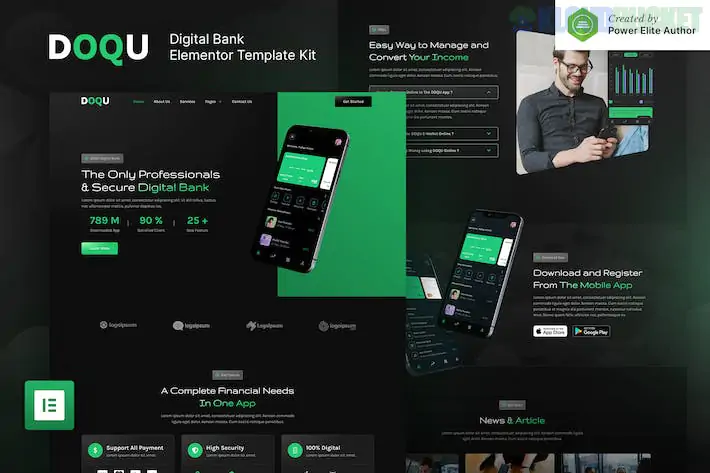
DOQU, developed by Jegtheme, is a sleek and modern Elementor Template Kit specifically designed for the Fintech sector. It features a premium "Dark Mode" aesthetic that is perfect for digital banks, e-wallets, cryptocurrency startups, and blockchain platforms.
What makes DOQU particularly accessible is that it is designed to work using entirely free plugins, meaning you don't necessarily need Elementor Pro to achieve the professional, high-end look shown in the demos.
DOQU comes with 14+ pre-designed templates that allow you to build a complete financial technology website in a few clicks:
Interactive Homepage: A conversion-focused landing page with vibrant gradients and clean CTA sections.
Service Details: Specialized layouts for "Mobile Banking," "Digital Wallet Features," and "Online Payments."
Pricing & Plans: Transparent, grid-based layouts to compare different account tiers or subscription levels.
Our Team & Career: Professional sections to showcase your leadership and attract new talent to your startup.
FAQ & Contact: Functional blocks designed to address security concerns and customer inquiries.
DOQU is optimized for the Hello Elementor theme. To get the kit working exactly like the demo, you will need to install the following free plugins:
Requirement
Details
Primary Builder
Elementor (Free version).
Theme Builder
Elementor – Header, Footer & Blocks (Used for site-wide navigation).
Add-ons
Jeg Elementor Kit (Provides the specialized fintech widgets).
Form Builder
Metform (Handles all your customer inquiry and sign-up forms).
Import Tool
Envato Elements plugin (used to upload and install the kit).
Vibrant Dark UI: It follows the "Modern Fintech" trend—using deep dark backgrounds paired with glowing gradients (purples, blues, and oranges) to create a high-tech, trustworthy feel.
Retina-Ready & Responsive: Every element is vector-based or high-resolution, ensuring the site looks sharp on everything from a 4K monitor to an iPhone.
Zero Coding Required: Since it’s a template kit, every pixel is editable via the Elementor drag-and-drop interface. You don't need to know HTML or CSS to change the branding.
The Base: Install a clean WordPress site and activate the free Hello Elementor theme.
The Tools: Install the Envato Elements plugin.
The Import: Go to Elements > Installed Kits, upload your DOQU ZIP file, and click "Install Requirements."
The Setup: * Import the Global Kit Styles first.
Import the Header and Footer and set them to "Entire Site" in the Header Footer & Blocks settings.
Import individual page templates as needed.
Pro Tip: When importing Metform (contact forms), you must import the form blocks separately. Once imported, simply select them within the Metform widget on your Contact page to make them live.
Would you like me to help you find a specific "Crypto Exchange" widget that integrates well with DOQU’s dark design, or are you looking for a guide on how to customize the gradient colors?
Subscribe to access unlimited downloads of themes, videos, graphics, plugins, and more premium assets for your creative needs.
.jpg) Help Us to Buy More New Theme/Plugin
Help Us to Buy More New Theme/Plugin
Published:
Jan 29, 2026 10:25 AM
Category:
Author:
OtherLicense:
GPL v2 or Later