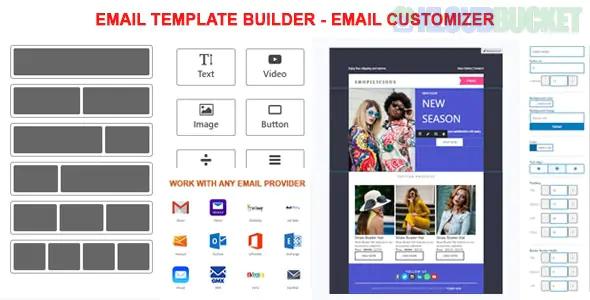
An Email Template Builder (or Email Customizer) for WordPress and WooCommerce is a tool that allows you to replace the standard, plain text-heavy system emails with professionally designed, branded HTML templates.
Most of these tools use a Drag-and-Drop interface, similar to Elementor or Gutenberg, so you don't have to touch any PHP or CSS code.
Branding: Add your logo, brand colors, and social media links to every order confirmation.
Engagement: Include "Recommended Products" or "Discount Coupons" in transactional emails to drive repeat sales.
Trust: Professional-looking emails reduce "buyer's remorse" and make your store look more established.
Tracking: Many builders offer test-send features so you can see exactly how your email looks on mobile vs. desktop before going live.
Plugin Name
Best For
Key Feature
YayMail
Ease of Use
Most intuitive "Elementor-like" interface for WooCommerce.
MailPoet
Marketing + Admin
Full email marketing suite that also styles transactional emails.
Kadence Email Designer
Budget (Free)
Best free option for basic styling (colors, fonts, header/footer).
EmailKit
Advanced Design
High-end customization with 25+ specialized WooCommerce elements.
FunnelKit Automations
Strategic Growth
Combines email design with automated customer "journeys."
Header Settings: Upload your logo, choose alignment, and set background colors.
Body Content: Customize the font size and link colors for the main message.
WooCommerce Blocks: Specific widgets for Order Tables, Shipping Addresses, and Payment Methods.
Dynamic Placeholders: Use "Shortcodes" like {customer_name} or {order_number} to personalize every message.
Footer Settings: Add your business address, copyright info, and social icons.
Install the Plugin: Most are available on the WordPress repository or CodeCanyon.
Open the Customizer: Usually found under WooCommerce > Email Customizer or a dedicated menu.
Choose a Template: Select the email you want to edit (e.g., New Order, Processing Order, or Customer Invoice).
Drag & Drop: Move elements around, swap out colors, and add your brand assets.
Test Send: Always send a test email to your own inbox to check the "From" name and mobile responsiveness.
Save & Activate: Once saved, the plugin will override the default WooCommerce template.
Pro Tip: For the best deliverability, always pair your email customizer with a plugin like WP Mail SMTP. This ensures your beautiful new designs actually hit the customer's inbox and not their spam folder.
Would you like me to help you compare the features of two specific plugins, like YayMail vs. Kadence, or do you need the specific shortcodes for a custom "Thank You" message?
Subscribe to access unlimited downloads of themes, videos, graphics, plugins, and more premium assets for your creative needs.
.jpg) Help Us to Buy More New Theme/Plugin
Help Us to Buy More New Theme/Plugin
Published:
Feb 01, 2026 10:46 AM
Version:
v1.2.7
Category:
Author:
OtherLicense:
GPL v2 or Later