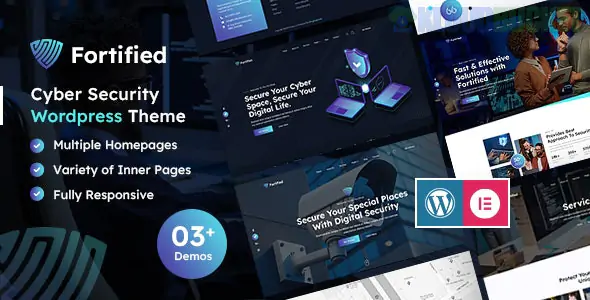
**Fortified** is a high-caliber WordPress theme (and sometimes available as a specific Elementor Template Kit) purpose-built for IT solutions, data protection firms, and cybersecurity agencies. It combines a "security-first" aesthetic—sharp lines, dark professional tones, and bold accents—with the technical flexibility needed to explain complex tech services.
Depending on where you acquired it, it may exist as a standalone **Premium Theme** or an **Elementor Template Kit**.
---
## 🛡️ Core Theme Features
Fortified is designed to establish "Digital Authority" the moment a visitor lands on the page:
* **Service-Oriented Design:** Includes dedicated layouts for Threat Protection, Network Audits, Cloud Security, and Incident Response.
* **Cybersecurity Custom Post Types (CPTs):** Unlike generic themes, it often includes pre-configured post types specifically for "Services" and "Case Studies," allowing for easier data management.
* **Pricing & Compliance Tables:** Clean, technical tables designed to compare security packages or compliance tiers (like GDPR, HIPAA, or ISO).
* **WooCommerce Integration:** Ready to sell security software, hardware (like firewalls), or consultation hours directly through your site.
* **Speed & SEO Optimized:** Built on **Bootstrap 4/5**, it prioritizes minimal CSS and clean code, which is critical for ranking in the highly competitive IT sector.
---
## 🛠️ Technical Requirements
To get the most out of the Fortified ecosystem, your environment should meet these standards:
* **WordPress Version:** 6.0 or higher.
* **Page Builder:** Primarily **Elementor** (Free or Pro).
* **PHP Version:** 7.4 or 8.x (highly recommended for security and speed).
* **Recommended Plugins:** * **MetForm:** For complex "Get a Quote" or "Security Audit Request" forms.
* **ElementsKit Lite:** Often used for the advanced sticky headers and megamenus.
* **WPML:** Translation-ready for global security firms.
---
## 🚀 Installation & "Hardening" Strategy
Since you are building a *Security* site, the installation process should be equally secure:
1. **The "One-Click" Import:** Most versions include a demo importer. Install the theme, activate required plugins, and use the "Demo Import" to get the professional cybersecurity structure instantly.
2. **Global Styling:** Set your brand colors (usually "Safety Blue" or "Alert Orange") in the Global Settings first.
3. **Hardening Your WP Site:** Since your site discusses security, you must walk the walk. Use a plugin like **Wordfence** or **Shield Security** to protect your Fortified-themed site from the very threats you describe on your pages.
4. **SSL is Non-Negotiable:** A security firm without a valid SSL (HTTPS) certificate is a major red flag. Ensure your certificate is active before you drive traffic.
---
## 💡 Growth Strategy for 2026
* **Lead with Case Studies:** In 2026, clients want proof of "Threat Neutralization." Use the Fortified Case Study templates to detail how you solved a specific breach or upgraded a client's infrastructure.
* **The "Security Audit" Lead Magnet:** Use a **MetForm** popup to offer a "Free 10-Point Security Checklist." It’s an excellent way to capture high-value B2B leads.
* **Tech Stack Logos:** Use the "Partner" slider to display the logos of the security tools you use (e.g., Fortinet, Cisco, CrowdStrike). This transfers the trust of big brands to your agency.
---
**Would you like me to help you configure the "Security Audit" contact form, or are you having trouble getting the demo content to match the professional preview you saw online?**
Subscribe to access unlimited downloads of themes, videos, graphics, plugins, and more premium assets for your creative needs.
.jpg) Help Us to Buy More New Theme/Plugin
Help Us to Buy More New Theme/Plugin
Published:
Feb 02, 2026 11:14 AM
Category:
Developer:
ThemeforestLicense:
GPL v2 or LaterTags: