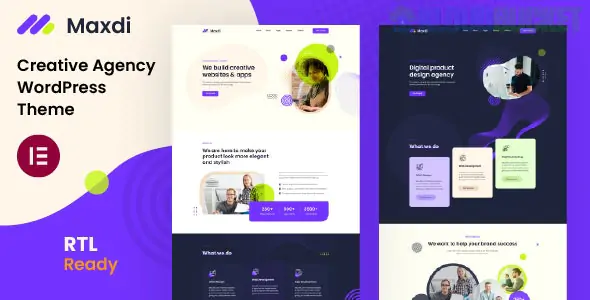
Maxdi is a modern, responsive WordPress theme designed for creative agencies, startups, digital marketing firms, and SEO specialists. It is a multipurpose theme that focuses on delivering a professional aesthetic with high-speed performance, making it ideal for businesses that offer design, development, and consulting services.
Built with Elementor, Maxdi allows for real-time visual editing without requiring coding skills. It is highly customizable and follows a clean, trendy design language that emphasizes visual storytelling.
Drag-and-Drop Page Builder: Fully integrated with Elementor, allowing you to build and modify pages using a visual interface.
One-Click Demo Import: Get your site up and running instantly by importing the pre-designed demo content.
Bootstrap 5 Framework: Built on the latest Bootstrap version, ensuring a mobile-first, responsive, and robust foundation.
Theme Options Panel: Easily manage global settings like colors, typography, and headers via the native WordPress Customizer.
SEO Optimized: Developed with clean code and structured data to help your agency rank better on search engines.
Child Theme Included: Allows for safe, advanced customizations without losing your changes during theme updates.
Maxdi typically includes over 12+ total pages to cover all agency needs:
| Category | Page Templates |
| :--- | :--- |
| Homepages | 2+ Unique, trendy homepage designs (Creative & Digital Agency). |
| Services | Service listing and detailed individual service pages. |
| Portfolio | Grid and masonry layouts to showcase projects and case studies. |
| Corporate | About Us, Our Team, Pricing Tables, and FAQ pages. |
| Blog | Professional blog layouts for content marketing and news. |
| Contact | Contact page with Google Maps integration and Contact Form 7 support. |
WordPress Compatibility: Supports the latest versions (WP 6.x and above).
Browser Compatibility: Tested on Chrome, Firefox, Safari, Edge, and IE11.
Plugin Support: Fully compatible with Contact Form 7, WPML (for multilingual sites), and Font Awesome icons.
Performance: Lightweight design and optimized assets for faster loading times.
Preparation: Download the theme package from ThemeForest and locate the installable maxdi.zip file.
Upload: In your WordPress dashboard, go to Appearance > Themes > Add New > Upload Theme.
Install & Activate: Upload the zip file, click Install Now, and then click Activate.
Install Plugins: A prompt will appear to install required plugins (Elementor, etc.). Click "Begin installing plugins."
Import Demo: Navigate to the theme's import tool (usually under Appearance > Import Demo Data) to load the demo layouts.
In 2026, client trust is built on page speed and mobile usability. Maxdi stands out because it avoids excessive "bloat" while providing a high-end feel. Its Bootstrap 5 core ensures that your site remains compatible with the newest web standards, and the Elementor integration ensures that your team can update the portfolio in minutes as new projects are completed.
How to install a WordPress Theme
This video provides a practical, step-by-step guide on how to upload and activate themes like Maxdi to ensure a successful setup.
Would you like me to help you configure the Elementor global settings for your agency's branding, or do you need assistance setting up the portfolio grid for your projects?
Subscribe to access unlimited downloads of themes, videos, graphics, plugins, and more premium assets for your creative needs.
.jpg) Help Us to Buy More New Theme/Plugin
Help Us to Buy More New Theme/Plugin
Published:
Jan 22, 2026 14:48 PM
Category:
Developer:
ThemeforestLicense:
GPL v2 or LaterTags: