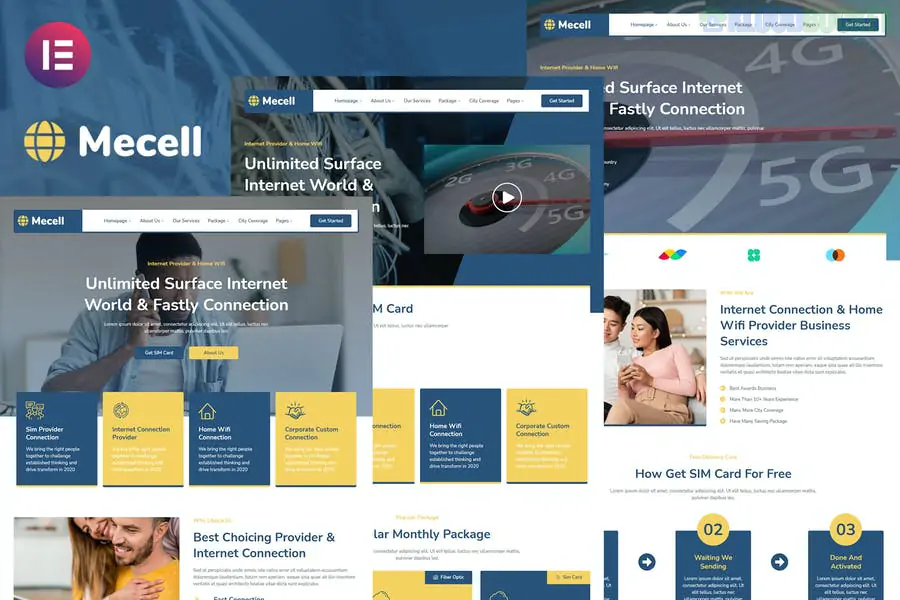
Mecell is a modern, high-tech Elementor Template Kit designed for Internet Service Providers (ISPs), home Wi-Fi businesses, satellite TV providers, and broadband companies. Developed by Jegtheme, it uses a professional blue-and-white color palette that communicates reliability and technological speed.
Like other kits from this developer, Mecell is highly efficient and designed to work with the free version of Elementor.
Modern Tech Design: Clean, corporate aesthetic with a focus on service packages and coverage maps.
10+ Pre-built Templates: Includes specialized pages for "Internet Packages" and "Speed Test" landing areas.
Service-Oriented Layouts: Dedicated sections to highlight fiber optics, wireless routers, and bundle offers.
No Elementor Pro Required: Most functionalities are handled by the included free addons.
Fully Responsive: Essential for a tech company; the site looks perfect on mobile, tablet, and desktop.
To get Mecell working exactly like the demo, you will need to install these free plugins:
Elementor (Free): The core builder.
Jeg Elementor Kit: Required. This adds the advanced widgets like pricing toggles and feature lists.
MetForm: For handling service inquiries and "Check Availability" forms.
Hello Elementor Theme: The recommended lightweight base theme.
Envato Elements Plugin: To import the kit.
Category
Page Layouts
Main Pages
Home, About Us, Contact, FAQ
Services
Services List, Single Service Detail, Package Pricing
Utility
Our Team, Testimonials, 404 Error
Blog/Updates
Blog Archive, Single Blog Post
Theme Builder
Custom Header, Footer, Global Style Kit
Pricing Toggles: Mecell often includes pricing sections. Use the Jeg Elementor Kit settings to customize these. If you offer Monthly vs. Yearly billing, ensure the toggle is clearly visible to help users compare costs.
Global Style Kit: Import the Global Kit Styles before any individual pages. This locks in the specific "ISP Blue" branding and typography across the entire site.
The "Check Availability" Form: This is the most important part of an ISP website. Use the MetForm integration to create a simple form where users can enter their zip code or address to see if your service reaches them.
Header & Footer: After importing, navigate to Jeg Elementor Kit > Header & Footer to assign the Mecell templates to the entire site.
Pro Tip: Since internet speed is a major selling point, consider adding a button in your header or hero section that links to a third-party speed test (like Speedtest.net) or create a dedicated "Support" page using the kit's layout to help customers troubleshoot their home Wi-Fi.
Would you like me to help you set up the MetForm for your "Check Availability" section, or do you need help customizing the Pricing Table to show different bandwidth speeds?
Subscribe to access unlimited downloads of themes, videos, graphics, plugins, and more premium assets for your creative needs.
.jpg) Help Us to Buy More New Theme/Plugin
Help Us to Buy More New Theme/Plugin
Published:
Feb 01, 2026 11:16 AM
Category:
Author:
OtherLicense:
GPL v2 or Later