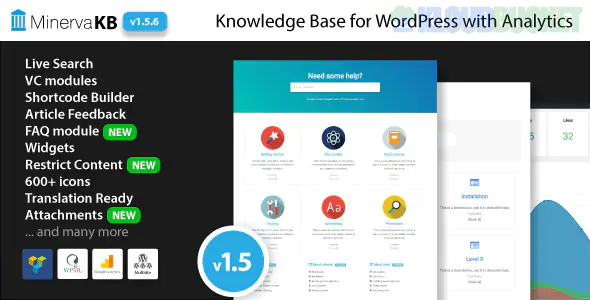
MinervaKB is a top-tier premium WordPress plugin designed to create a professional, searchable knowledge base or FAQ section. It is widely recognized in 2026 for its "all-in-one" approach, combining a powerful search engine with an internal analytics dashboard that eliminates the need for external tracking tools.
Unlike many other plugins that charge monthly for advanced stats, MinervaKB provides deep insights for a one-time purchase price.
The standout feature of MinervaKB is its built-in tracking. It doesn't just count views; it helps you understand why users are contacting support.
Search Query Tracking: See exactly what terms users are typing into the search bar. This helps you identify "content gaps" (e.g., if many people search for "refunds" but you have no article for it).
Article Feedback: Includes a "Was this helpful?" voting system (Yes/No). You can view reports on which articles are solving problems and which need a rewrite.
Views vs. Engagement: Tracks how long users stay on an article to ensure they are actually reading the content.
Google Analytics Integration: If you prefer centralized data, it can sync its events directly to your GA4 dashboard.
AJAX Live Search: A "Google-like" experience where results appear instantly as the user types, including category icons and descriptions.
Multiple Knowledge Bases: Create separate documentation hubs for different products or departments on a single WordPress install.
Dynamic Table of Contents: Automatically generates a clickable TOC based on your H1-H6 tags, allowing users to jump to specific sections.
Content Restriction: Lock specific articles or entire categories so they are only visible to logged-in users, specific roles, or employees.
FAQ Module: Includes a dedicated FAQ builder with accordion and list styles that can be embedded anywhere via shortcodes or Elementor widgets.
Installation: Upload the plugin and navigate to MinervaKB > Settings.
Demo Import: Use the One-Click Demo Import to start with a professional layout (Corporate, Modern, or Minimal).
Define Topics: Organize your content by creating "Topics" (these act like categories).
Add Articles: Create your documentation using the standard WordPress editor or popular page builders like Elementor or Visual Composer.
Enable Analytics: Go to MinervaKB > Analytics to activate the tracking engine. Data will begin appearing after the first few visits.
Feature
MinervaKB
BetterDocs
Heroic KB
Price (approx.)
$69 (One-time)
$69/year (Starter)
$149/year (Essential)
Analytics
Built-in & Deep
Basic (Pro for detail)
Excellent
Search Style
Highly Customizable
Modern/Fixed
Clean/Professional
Best For
Data-driven owners
Elementor users
Large Enterprises
MinervaKB is built with Schema.org markup. This means your FAQ questions and "star" ratings can appear directly in Google search results, significantly increasing your click-through rate.
Would you like me to show you how to configure the "Search Insights" report so you receive a weekly email summary of what your users are searching for?
Subscribe to access unlimited downloads of themes, videos, graphics, plugins, and more premium assets for your creative needs.
.jpg) Help Us to Buy More New Theme/Plugin
Help Us to Buy More New Theme/Plugin
Published:
Jan 21, 2026 13:00 PM
Version:
v2.0.9
Category:
Author:
OtherLicense:
GPL v2 or Later