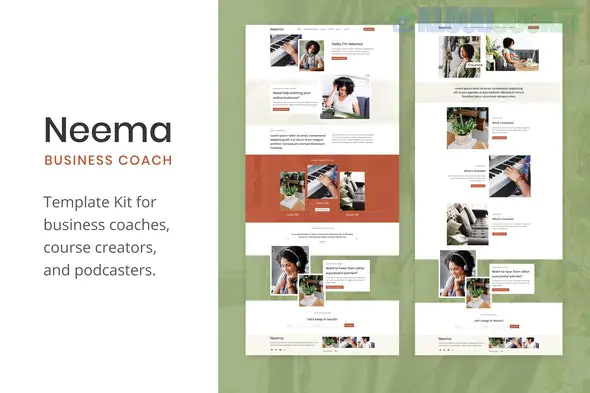
Neema is a streamlined, elegant Elementor Template Kit designed specifically for business coaches, mentors, and consultants. Unlike the more technical industrial kits we discussed, Neema focuses on "Personal Brand Authority"—using clean layouts, elegant typography, and dedicated sections for coaching programs and storytelling.
Here is the essential guide for setting up Neema.
Neema typically features 8 to 12 customizable templates that prioritize lead generation and brand trust:
Authority-Building Home Page: A clean hero section designed to feature a high-quality photo of you (the coach) with a clear Call-to-Action (CTA).
Coaching Services & Programs: Dedicated pages to break down your 1-on-1 coaching, group workshops, or digital courses.
About / My Story: A layout optimized for long-form storytelling to connect with potential clients.
Booking / Contact Form: Integrated sections for "Discovery Calls" or consultation requests.
Success Stories: Professional testimonial grids and case study layouts.
One of Neema’s biggest advantages is that it is very lightweight and generally does not require Elementor Pro. It is built using popular free extensions:
Elementor (Free Version): The core page builder.
ElementsKit Lite: This is the most important dependency for Neema. It handles the headers, footers, and advanced widgets like "Icon Boxes" and "Testimonial Sliders."
WPForms Lite: Usually used for the contact and discovery call forms.
Hello Elementor Theme: The recommended "blank" theme for the best performance.
Themes & Plugins: Install the Hello Elementor theme and the Envato Elements plugin.
The Import: Upload your neema-kit.zip via Elements > Installed Kits.
Requirements: Click the orange "Install Requirements" button. This will automatically install ElementsKit Lite and WPForms for you.
Global Styles: Important! Import the "Global Kit Styles" first. This sets the elegant "Coach" fonts and the sophisticated color palette across the whole site.
Page Creation: Create your "Home" page, set the Page Layout to Elementor Full Width, and then import the Home template from the kit.
Signature Branding: Coaching is about you. Replace the placeholder images with high-resolution, professional photography of yourself in a "work" environment.
The "Discovery Call" CTA: Change the default "Contact" buttons to something more specific like "Book Your Free 15-Min Discovery Call." Use a plugin like Calendly to link directly to your calendar.
Typography is Key: Neema relies on clean, high-end fonts. If you change them, ensure you keep the "weight" of the headers consistent to maintain the premium feel.
Lead Magnet: Business coaching sites thrive on lead magnets (like a free PDF guide). Use the Neema "Newsletter" section to offer a free resource in exchange for an email address.
Would you like me to help you brainstorm the copy for your "Coaching Programs" section, or are you having trouble getting the header to appear on all pages?
Subscribe to access unlimited downloads of themes, videos, graphics, plugins, and more premium assets for your creative needs.
.jpg) Help Us to Buy More New Theme/Plugin
Help Us to Buy More New Theme/Plugin
Published:
Feb 02, 2026 09:54 AM
Category:
Author:
OtherLicense:
GPL v2 or Later
![WooCommerce Binary Multi Level Marketing [MLM] 2.0.0](https://pub-9527534656ad43fc89ba1fea2f73e52a.r2.dev/files/items/Ahw2RZcZ9cnrmdT_1762312718.webp)