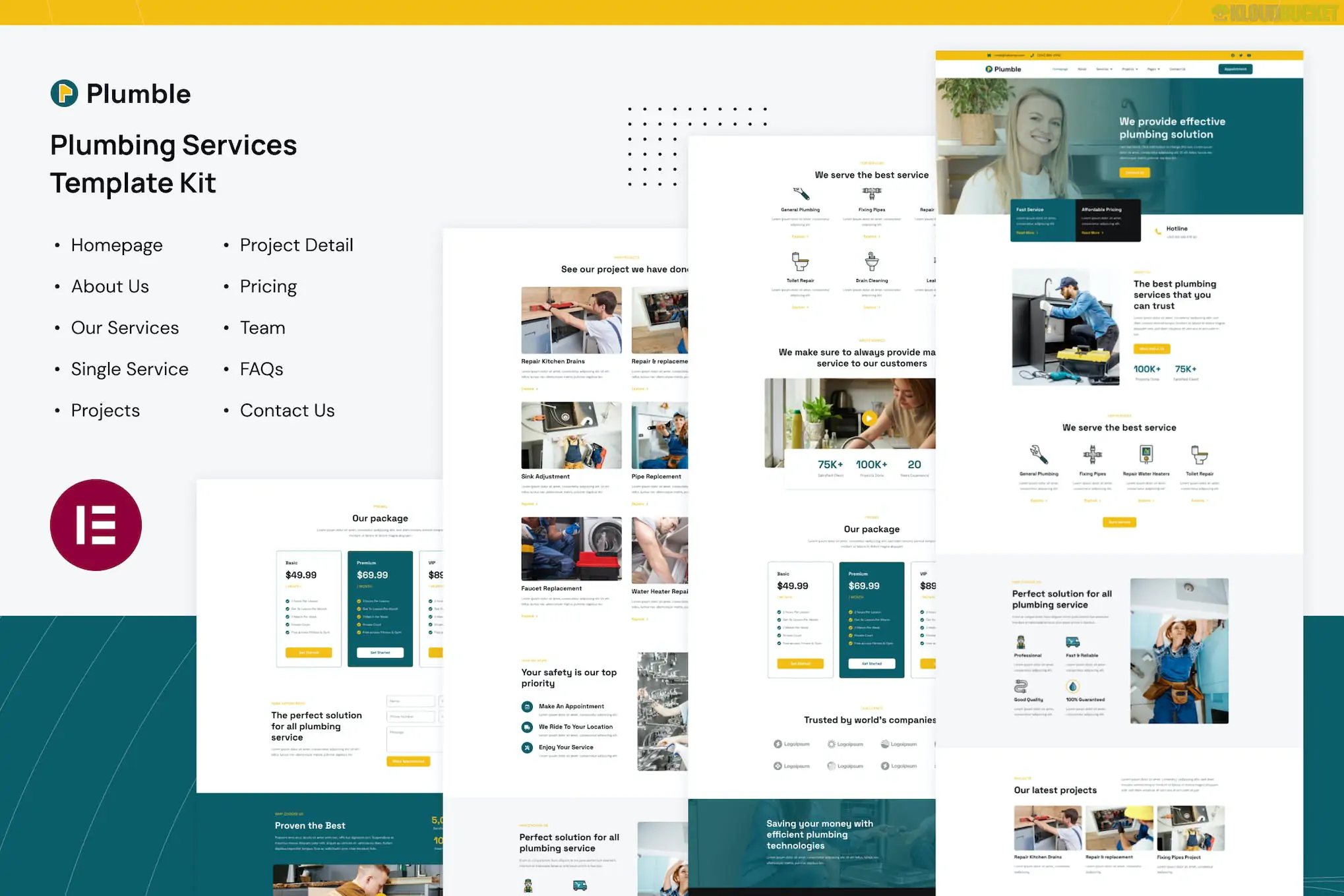
Plumble is a clean and modern Elementor Template Kit specifically built for plumbers, home maintenance, and repair services (HVAC, heating, and drainage). It focuses on a professional, high-trust aesthetic that is essential for local service businesses.
As with other kits, Plumble provides the page content and design data for the Elementor page builder. It is not a standalone theme.
Professional Plumbing Aesthetic: Uses a blue and orange color scheme (standard for the industry) to convey reliability and urgency.
10+ Ready-to-Use Templates: Carefully crafted layouts for all standard service business pages.
True No-Code Customization: Fully drag-and-drop, making it easy for business owners to update their phone numbers or service lists.
Responsive & Retina-Ready: Optimized to look great on mobile devices, which is where most emergency plumbing searches happen.
Fast Loading: Lightweight design to help with local SEO rankings.
To use Plumble effectively, ensure your WordPress site is set up with:
Elementor (Free): The primary page builder.
Elementor Pro: Required for some advanced features, specifically for the Theme Builder (Header and Footer customization).
Envato Elements Plugin: Used to import the kit directly into WordPress.
Hello Elementor Theme: The recommended lightweight theme for the best performance.
Template Type
Included Layouts
Main Pages
Home, About Us, Contact Us, FAQ
Service Pages
Services Overview, Single Service Detail (e.g., Pipe Repair)
Company Info
Our Team, Pricing Plans
Theme Builder
Header, Footer, 404 Error Page, Global Kit Styles
Install Plugins: Activate Elementor, Elementor Pro, and the Envato Elements plugin.
Upload the Kit: Navigate to Elements > Installed Kits and upload your Plumble .zip file.
Install Requirements: Click the "Install Requirements" button in the orange banner to ensure all necessary tools are active.
Import Styles First: Click "Import" on the Global Kit Styles first to set your site-wide fonts and colors.
Import Templates: Import the pages one at a time. They will appear under Templates > Saved Templates.
Assign Header/Footer: If using Elementor Pro, go to Templates > Theme Builder to set your imported header and footer to "Entire Site."
Pro Tip: Since many plumbing customers call from mobile devices in emergencies, make sure to use the "Click to Call" feature on your phone number buttons (use the link tel:+1234567890).
Would you like me to show you how to set up a "Request a Quote" form using Elementor with this kit?
Subscribe to access unlimited downloads of themes, videos, graphics, plugins, and more premium assets for your creative needs.
.jpg) Help Us to Buy More New Theme/Plugin
Help Us to Buy More New Theme/Plugin
Published:
Feb 01, 2026 10:28 AM
Category:
Author:
OtherLicense:
GPL v2 or Later