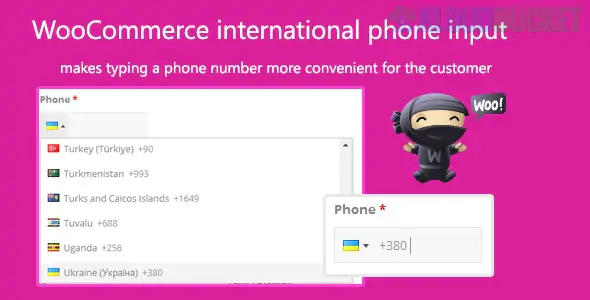
Implementing International Phone Input in WooCommerce is a critical step for stores selling globally. By default, WooCommerce provides a plain text field for phone numbers, which often leads to formatting errors and failed deliveries.1
Adding an international input converts that standard field into a dynamic selector with country flags, automatic dial codes, and real-time validation.2
Most professional solutions utilize the intl-tel-input library, which is the industry standard for telephone inputs.3
Plugin Name
Best For
Price
Key Features
Phone Number Validation (Official)
High-volume stores
~$29/yr
Real-time validation, Twilio-supported library, Blocks compatible.
Phone Validator with Flags
Budget-friendly/Simple
Free
Lightweight, auto-detects country, works with standard fields.
Fluid Checkout PRO
Full checkout redesign
Included in Pro
Adds flags to all phone fields + "precise" validation rules.
International Telephone Input
Custom CSS/ID targeting
Free
Best if you have custom fields outside standard Billing/Shipping.
When choosing a plugin, ensure it supports these three core functionalities:
Flag Dropdown & Dial Codes: Automatically prefixes the number with the correct code (e.g., +1 for US, +44 for UK) based on the user's selection.
Auto-Country Detection: Uses IP Geo-location or the "Billing Country" selection to pre-fill the flag, reducing friction for the customer.
Standardization (E.164): Saves numbers in the global format ($+[\text{country code}][\text{number}]$), ensuring they work perfectly with shipping carriers and SMS marketing tools.
If you are using a standard plugin like Phone Validator with Flags for WooCommerce:
Install & Activate: Search for the plugin in your WordPress dashboard under Plugins > Add New.
Configure Initial Country: Go to your plugin settings and set the Default Country. Most stores set this to "Auto-detect" or their primary market.
Sync with Selling Locations: Ensure the plugin is set to only show countries you actually ship to (synced with WooCommerce > Settings > General > Selling locations).
Test the Validation: Add a product to your cart, go to checkout, and try entering a number that is too short or lacks a dial code to see if the error message triggers correctly.
If you prefer not to use a dedicated plugin and are comfortable with code, you can enqueue the intl-tel-input JavaScript library manually in your theme’s functions.php:
JavaScript
// Example JS initialization var input = document.querySelector("#billing_phone"); window.intlTelInput(input, { initialCountry: "auto", geoIpLookup: function(callback) { fetch('https://ipinfo.io/json') .then(res => res.json()) .then(data => callback(data.country)); }, utilsScript: "path/to/utils.js" // required for validation/formatting });
Would you like me to find a specific code snippet to make the phone field optional for certain countries while keeping it required for others?
Subscribe to access unlimited downloads of themes, videos, graphics, plugins, and more premium assets for your creative needs.
.jpg) Help Us to Buy More New Theme/Plugin
Help Us to Buy More New Theme/Plugin
Published:
Jan 10, 2026 18:52 PM
Version:
v2.1.5
Category:
Author:
OtherLicense:
GPL v2 or Later