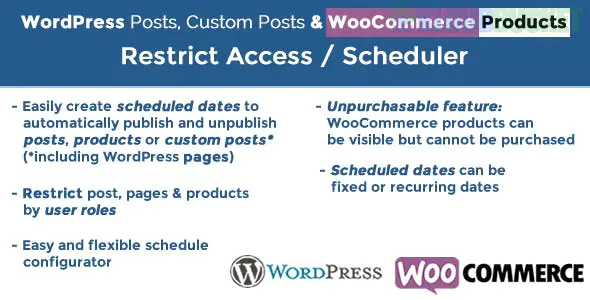
The WordPress Posts & WooCommerce Products Scheduler / Restrict Access (WPPS) is a versatile plugin designed for store owners and content creators who need precise control over when their content is visible or purchasable.
Unlike the basic WordPress "Schedule" feature which only handles the initial publishing, this plugin allows you to automate the entire lifecycle of a post or product, including unpublishing it or making it "view only" during specific times.
Automatic Publish/Unpublish: Set specific dates and times for posts or products to appear and disappear from your site.
Recurring Schedules: Unlike standard scheduling, you can set content to be visible only on certain days of the week (e.g., "Lunch Menu" available only Mon–Fri, 11 AM – 2 PM).
"Not Buyable" Mode: For WooCommerce, you can keep a product visible so customers can see it, but automatically hide the "Add to Cart" button during off-hours or before a launch.
User Role Restrictions: Combine scheduling with access control. For example, make a "VIP Sale" product visible only to "Gold Members" for the first 24 hours.
Flash Sales: Automatically launch a product at midnight and unpublish it when the sale ends.
Seasonal Catalogs: Schedule entire categories of products (like "Winter Collection") to appear only during specific months.
Daily Specials: Ideal for restaurants or service providers who offer different items depending on the day of the week.
Content Teasing: Show a "Coming Soon" post to everyone, but allow "Subscribers" to read the full content early.
Feature
Description
Rule-Based System
Create global rules that apply to specific categories or individual items.
Countdown Messages
Display custom messages like "This product will be available in 2 hours."
Redirection
Automatically redirect users to a specific page (like a "Sale Ended" page) if they try to access expired content.
HTTPS Visibility
Choose whether an item is completely hidden (404 error) or just restricted (visible but not clickable).
The default WordPress scheduler is a "one-way" trigger: it changes a post from Draft to Published. It cannot:
Automatically unpublish a post later.
Switch a product to read-only (hiding the buy button).
Set recurring visibility (e.g., every Tuesday).
Apply rules to entire categories at once.
Install & Activate: Once activated, look for the "Scheduler" menu in your WordPress sidebar.
Create a Rule: Give your rule a name (e.g., "Weekend Sale") and select the Post Type (Posts, Pages, or Products).
Set the Date/Time: Define your start and end points. You can use absolute dates or recurring "Day of the Week" rules.
Select Items: Assign the rule to specific products or entire categories.
Would you like me to help you set up a specific recurring schedule for a product, or are you looking for a comparison with "Sale Price" scheduling?
Subscribe to access unlimited downloads of themes, videos, graphics, plugins, and more premium assets for your creative needs.
.jpg) Help Us to Buy More New Theme/Plugin
Help Us to Buy More New Theme/Plugin
Published:
Jan 23, 2026 14:09 PM
Category:
Author:
OtherLicense:
GPL v2 or Later