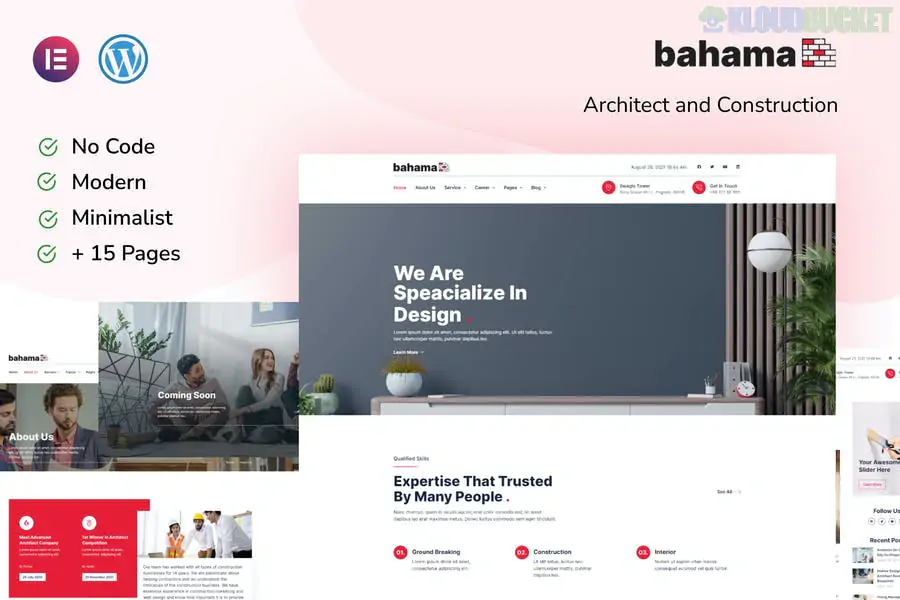
Bahama is a high-end Elementor Template Kit designed specifically for general contractors, architectural firms, and construction companies. Developed by deverust, it strikes a balance between technical industrialism and modern architectural elegance, making it ideal for firms that want to showcase both their building capabilities and their design aesthetic.
Like most professional kits, Bahama is a collection of layouts rather than a standalone theme. It is highly optimized for the Hello Elementor theme.
15+ Ready-to-Use Templates: A robust library that covers every corner of a construction or design business website.
Architectural Precision: Clean, grid-based layouts that emphasize blueprints, 3D renders, and project photography.
Fully Responsive & Retina Ready: Ensures your portfolio looks sharp and structural on everything from a site manager's tablet to a client's smartphone.
No Coding Required: Every page is built using the visual drag-and-drop power of Elementor.
Cross-Browser Support: Extensively tested on Chrome, Firefox, Safari, and Edge to ensure consistent rendering.
To achieve the exact look of the Bahama demo, your WordPress setup needs:
Elementor (Free): The core page builder plugin.
Elementor Pro: Required for the Theme Builder (Header, Footer, and Single Project layouts) and advanced widgets.
Jeg Elementor Kit: This specific addon is required to handle the kit's advanced styling and functional elements.
Hello Elementor Theme: The recommended lightweight base for the best performance.
The kit provides a comprehensive set of pages to build a complete authority site:
| Category | Included Templates |
| :--- | :--- |
| Corporate | Home, About Us, Our Team, FAQ |
| Services | Services Overview, Service Detail (Single View) |
| Portfolio | Our Projects (Gallery), Project Detail (Case Study) |
| Engagement | Contact Us, Testimonials, Pricing |
| Utility | Header, Footer, 404 Error, Global Style Kit |
Global Styles First: Upon importing via the Envato Elements plugin, always click "Import" on the Global Kit Styles first. This ensures the specific "Bahama" color palette and typography are applied site-wide.
Showcasing Projects: Use the Project Detail template to go beyond just a gallery. Include "Project Value," "Location," and "Architectural Style" to provide the technical context that high-end clients look for.
MetForm Integration: While the kit handles the layout, you will need to link the inquiry buttons to a form plugin like MetForm or the native Elementor Pro Forms to start receiving project leads.
Optimizing Imagery: Construction and architecture sites are image-heavy. Use a plugin like Smush or Imagify to compress your project photos so the site remains fast and passes "Core Web Vitals."
Visual Tip: Architecture is about light and space. When replacing the demo images, use wide-angle "Hero" shots for the homepage and detailed "Macro" shots (like wood grain or brickwork) for the service sections to maintain the kit's premium feel.
Would you like me to help you set up a "Request a Consultation" popup using Elementor Pro, or do you need the steps to customize the Header for your firm's logo?
Setting up Elementor Template Kits
This walkthrough provides a comprehensive guide on how to import, customize, and manage the design system of Elementor Template Kits like Bahama.
Subscribe to access unlimited downloads of themes, videos, graphics, plugins, and more premium assets for your creative needs.
.jpg) Help Us to Buy More New Theme/Plugin
Help Us to Buy More New Theme/Plugin
Published:
Feb 01, 2026 11:21 AM
Category:
Author:
All In One PluginLicense:
GPL v2 or Later