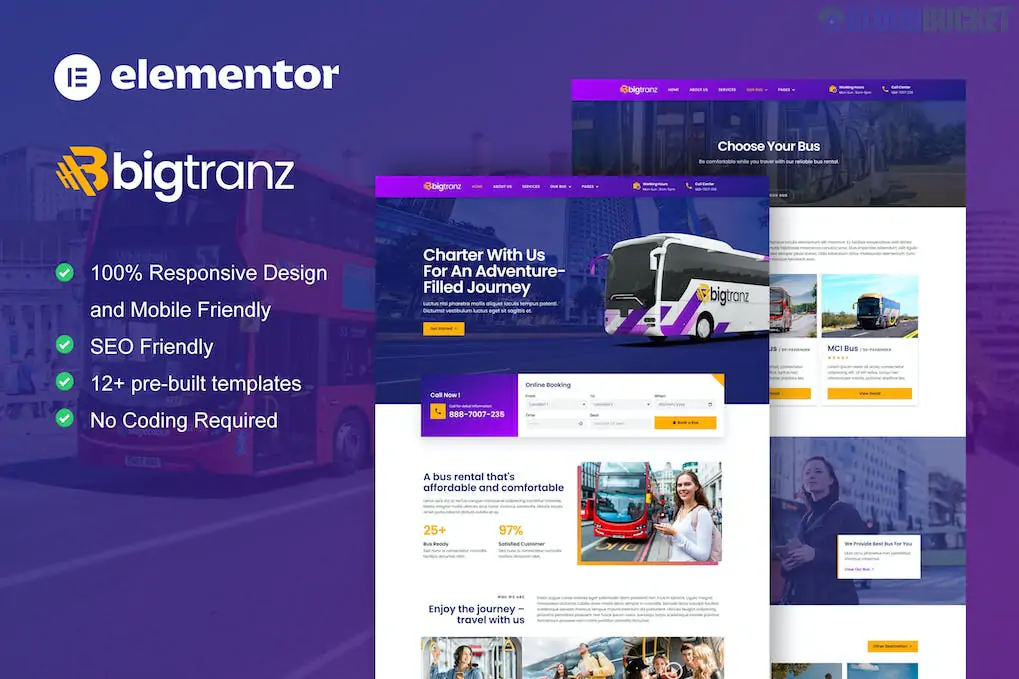
BigTranz is a sleek and high-performance Elementor Template Kit specifically tailored for bus charter companies, luxury shuttle services, and transportation rental businesses. It features a bold, corporate aesthetic with a heavy focus on fleet presentation and lead generation.
Because this kit is designed to professional standards, it utilizes Elementor Pro to handle complex site parts like the global header, footer, and dynamic bus detail pages.
Modern Fleet Showcase: Dedicated layouts to display your fleet of buses, coaches, and mini-vans with technical specifications.
Pro Theme Builder Ready: Uses Elementor Pro to manage site-wide headers, footers, and archive templates.
High-Converting CTAs: Strategically placed "Book a Bus" buttons and inquiry sections designed to capture leads.
Mobile-First Response: Fully responsive and optimized for clients who often book transportation while on the move.
12+ Professional Templates: A complete package covering everything from bus details to team profiles.
Category
Page Templates
Main Pages
Home, About Us, Services, Book a Bus, Contact
Fleet & Details
Our Bus (List), Bus Detail (Single Page)
Team & Support
Team, FAQ, 404 Error Page
Blog
Blog Archive, Single Blog Post
System
Header, Footer, Global Style Kit
To use the BigTranz kit effectively, ensure you have the following installed:
WordPress 5.7+
Elementor (Free)
Elementor Pro: Required for the Theme Builder and several advanced widgets.
ElementsKit Lite: Used for additional navigation and layout modules.
Skyboot Custom Icons: Provides the specific transportation and utility icons used in the design.
Hello Elementor Theme: The recommended lightweight foundation for this kit.
Plugin Setup: Install and activate the Template Kit Import plugin from the WordPress repository.
Upload: Go to Tools > Template Kit and upload your bigtranz.zip file.
Install Requirements: Click the orange notification banner to "Install Requirements"; this activates the necessary add-ons.
Import Global Styles First: This is critical. Import the Global Kit Styles first to ensure your site adopts the correct corporate colors and typography.
Build Your Pages: Import the page templates one by one.
Theme Builder: Go to Templates > Theme Builder to activate your Header and Footer for the entire site.
Pro Tip: For the Bus Detail page, you can use Elementor Pro’s Dynamic Tags to link the template to a "Custom Post Type." This allows you to manage your fleet like a catalog—adding new vehicles in the WordPress dashboard and having them automatically formatted by the BigTranz design.
Would you like me to show you how to set up a "Custom Post Type" for your buses, or do you need help customizing the "Book a Bus" inquiry form?
Subscribe to access unlimited downloads of themes, videos, graphics, plugins, and more premium assets for your creative needs.
.jpg) Help Us to Buy More New Theme/Plugin
Help Us to Buy More New Theme/Plugin
Published:
Jan 17, 2026 13:41 PM
Category:
Author:
OtherLicense:
GPL v2 or Later