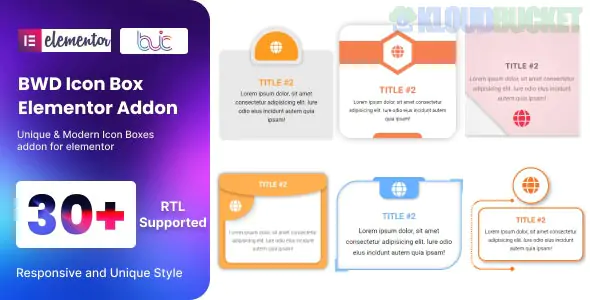
The BWD Icon Box addon is a specialized Elementor widget designed by Best WP Developer to help you showcase features, services, or USPs (Unique Selling Propositions) with more visual flair than the standard Elementor Icon Box.
While the default Elementor widget is great for basics, BWD focuses on pre-designed styles that include complex borders, background shapes, and hover animations out of the box.
30+ Unique Presets: Unlike the standard widget where you start from scratch, BWD offers over 30 "ready-to-go" designs with different icon placements, background shapes, and border styles.
Advanced Hover Effects: Includes interactive animations where the icon might rotate, the background color might slide in, or the entire box might tilt on hover.
Fully Customizable: Even after choosing a preset, you have full control over:
Icon Selection: Use FontAwesome, custom SVGs, or uploaded images.
Colors: Set normal and hover colors for the icon, title, description, and the box container.
Typography: Access to all Google Fonts and standard Elementor text styling.
RTL Support: Fully compatible with right-to-left languages (Arabic, Hebrew, etc.).
Lightweight Code: Built primarily with CSS to ensure your page remains fast and SEO-friendly.
Feature
Standard Elementor Widget
BWD Icon Box Addon
Design Starting Point
Clean slate (requires manual styling)
30+ Designer presets
Background Shapes
Simple square/circle
Custom polygons, blobs, and skewed boxes
Hover Animations
Basic (Grow, Shrink, Pulse)
Complex (Slide-ins, Multi-layer color shifts)
Setup Speed
Medium (if you want it to look "custom")
Fast (pick a style and change the color)
The BWD Icon Box is typically found within the BWD Elementor Addons Bundle, which is a "best-of" collection of their widgets.
Installation: Install the "BWD Elementor Addons" plugin from the WordPress repository (Free) or upload the standalone Pro version if you purchased it from CodeCanyon/Envato.
Activation: Ensure the "Icon Box" widget is toggled ON in the BWD Addons settings dashboard.
Deployment: Open your page in Elementor, search for "BWD Icon Box," and drag it onto your layout.
Style Choice: Under the Content tab, use the "Style" dropdown to flip through the 30+ different visual layouts.
Service Summaries: Displaying "What We Do" on a homepage with icons like a wrench, lightbulb, or shield.
Core Values: Listing company principles (e.g., "Integrity," "Innovation") with high-quality icons.
Product Features: Highlighting the technical specs of a software or physical product.
Would you like me to help you find a specific icon style (like "Glassmorphism" or "Industrial") that matches your theme, or do you need help troubleshooting a display issue with the icon box?
Subscribe to access unlimited downloads of themes, videos, graphics, plugins, and more premium assets for your creative needs.
.jpg) Help Us to Buy More New Theme/Plugin
Help Us to Buy More New Theme/Plugin
Published:
Jan 18, 2026 11:52 AM
Category:
Author:
OtherLicense:
GPL v2 or LaterTags: