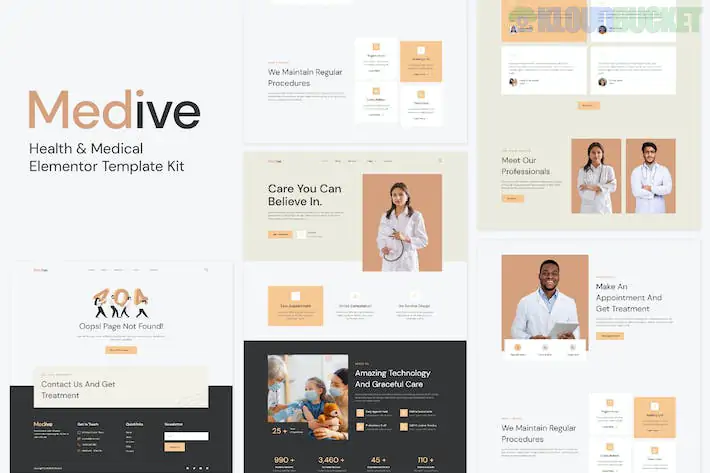
Medive is a comprehensive, modern Elementor Template Kit tailored for medical centers, specialized clinics, and individual healthcare practitioners. It emphasizes a clean, corporate-medical aesthetic that uses plenty of white space and professional typography to instill immediate trust in patients.
True to your library of kits, Medive is "Free Version Friendly," requiring only the free version of Elementor to function.
Medive offers a complete ecosystem for a healthcare website, typically featuring 15 ready-to-use templates:
Versatile Homepage: Includes a high-impact hero section with clear "Call to Action" buttons for bookings and emergency contact.
Specialized Service Pages: Templates for both "Services Overview" and "Service Details," allowing you to explain complex medical treatments clearly.
Professional Doctor Profiles: Dedicated layouts for "Our Doctors" and individual "Doctor Profiles" to showcase certifications and expertise.
Patient Resources: Includes "FAQs" for common patient questions and "Pricing" for standard check-up packages.
Communication Hub: Clean "Blog" and "Single Post" layouts for health news, plus a functional "Contact" page.
Functional Site Parts: Includes pre-designed Header, Footer, and a custom 404 error page.
Medive is built to be lightweight and accessible, utilizing the following free plugins:
Elementor (Free Version): The core builder.
ElementsKit Lite: Essential for building the advanced navigation and header/footer elements.
DethemeKit for Elementor: Often used in this specific kit for unique medical-themed widgets.
WPForms Lite: Powering the patient inquiry and contact forms.
Elementor – Header, Footer & Blocks: Provides site-wide global sections without needing Pro.
Hello Elementor Theme: The recommended foundation for the best performance.
To ensure the clinical blue-and-white branding and specific spacing apply correctly, use this sequence:
Preparation: Install Hello Elementor and the Envato Elements plugin.
Upload: Go to Elements > Installed Kits and upload your medive-kit.zip.
Requirements: Click the orange "Install Requirements" banner to automatically activate DethemeKit, ElementsKit, and WPForms.
Global Styles First: Import the Global Kit Styles first. This is non-negotiable for medical kits; it sets the clean font hierarchy and "medical blue" color palette site-wide.
Build Your Pages: Create your pages (Home, About, Services), set them to Elementor Full Width, and import the corresponding templates.
The "One-Click" Booking: Use the header template to place a "Book Appointment" button in a prominent, high-contrast color. In healthcare, reducing the steps to an appointment is the best way to increase conversions.
Visual Hierarchy: Use the Service Detail page to break down treatments into digestible chunks. Patients are often stressed; using icons and bullet points helps them find the info they need quickly.
Credibility through Imagery: Replace stock photos with real photos of your clinic and staff. Patients want to see the environment where they will be treated.
Accessibility Check: Ensure your contrast ratios are high (dark text on white backgrounds). Many medical site visitors may have visual impairments or be viewing the site in stressful situations.
Would you like me to help you draft the "Department Description" text for your service pages, or are you having trouble getting the WPForms "Appointment" fields to align with the kit's design?
Subscribe to access unlimited downloads of themes, videos, graphics, plugins, and more premium assets for your creative needs.
.jpg) Help Us to Buy More New Theme/Plugin
Help Us to Buy More New Theme/Plugin
Published:
Feb 02, 2026 10:36 AM
Category:
Author:
OtherLicense:
GPL v2 or LaterTags: